Karaoke Night at Home: How to Set Up the Ultimate Singing Experience
Anil Thakor
Founder, Sangeet Easy
February 10, 2026
6 min read
Whether it's a spontaneous Antakshari round at a family gathering or a full-blown weekend party with friends, singing is in our DNA. But why limit the fun to expensive karaoke bars when you can create a professional setup right in your living room?
Gone are the days of bulky karaoke machines and expensive discs. Today, all you need is a smart setup and the right software to bring the studio experience home. In this guide, we'll walk you through how to host the ultimate karaoke night using Sangeet Easy.
Step 1: The Hardware Setup
Before we get to the songs, let's get the stage ready. You don't need a professional studio, but a few key pieces of hardware make a world of difference:
The Big Screen (TV or Projector): This is crucial for lyrics. While you control the music, your guests need a clear view of the words. A smart TV or a projector connected to your laptop via HDMI is ideal.
Sound System: A good Bluetooth speaker or a Home Theater system will do. Ensure there's minimal latency (delay) if you're using Bluetooth. For the best experience, use an Aux cable to connect your laptop directly to the speakers.
Microphones: This is the heart of the experience. Wireless microphones are best for passing around the room. You can find affordable dual wireless mic sets online that plug directly into your speaker's mic input.
Step 2: Sangeet Easy – Your Digital Karaoke Machine
With the hardware set, you need a smart way to manage songs and lyrics. This is where Sangeet Easy shines. Unlike YouTube karaoke tracks where you have no control, Sangeet Easy gives you a professional dashboard.
You can't change the key (scale) to match your voice.
You can't separate the lyrics screen from the control screen.
The Sangeet Easy Advantage
Sangeet Easy solves all these problems with dedicated tools designed for singers.
Step 3: Mastering the Dual-Screen Setup
Imagine you're the DJ. You want to queue up the next song, adjust the volume, or change the scale on your laptop, but you want your friends to only see the lyrics on the TV.
Sangeet Easy's "Share Lyrics" feature makes this possible:
Connect Laptop to TV: Use an HDMI cable to extend your display (don't duplicate/mirror it). This gives you two separate screens.
Open Sangeet Easy: Launch the app on your laptop and pick a song.
Launch Lyrics Share: In the lyrics modal, look for the Monitor/Share icon (top right). Click it to open a dedicated lyrics window.
Move & Maximize: Drag this new window to your TV screen and press F11 to go fullscreen.
Now, your TV displays beautiful, large, synced lyrics in a "Projector Mode," while your laptop remains your control center. You can search for the next track without disturbing the current singer!
Step 4: Finding the Right Key (Scale)
Not everyone can sing as high as Arijit Singh or as low as Kishore Kumar. One of the biggest mood killers in karaoke is struggling to hit the notes.
Use the Vocal Range Finder:
Before the party starts, have your guests try the Vocal Range Finder tool on Sangeet Easy. It helps them identify their comfortable range.
Once you know their range, use the Pitch Shift feature on the Player to adjust the song's key instantly.
Lower the key for a comfortable baritone or raise it for a high pitch all in real-time without distorting the audio quality.
Step 5: The Ultimate Playlist
A great karaoke night needs a mix of genres. Here are some crowd-pleasers to get you started:
The Classics:Chura Liya Hai Tumne Jo Dil Ko, Lag Ja Gale, Mere Sapno Ki Rani.
90s Nostalgia:Tujhe Dekha To, Chaiyya Chaiyya, Pehla Nasha.
Modern Hits:Kesariya, Apna Bana Le, Lutt Putt Gaya.
Use Sangeet Easy's Lyrics Search to find synced LRC files for almost any song. If a song isn't available, you can even paste your own lyrics!
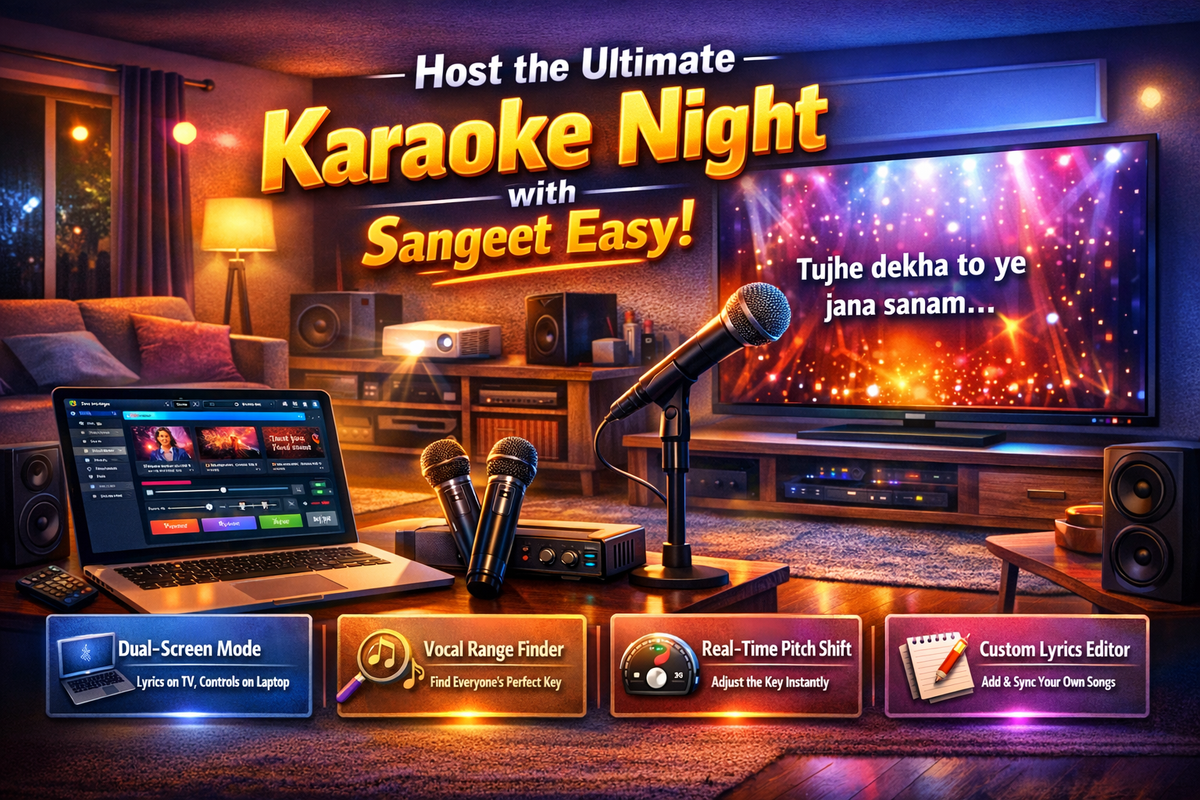
Host the Ultimate Karaoke Night with Sangeet Easy
Turn any living room into a pro-style karaoke lounge using a simple dual-screen setup and Sangeet Easy.
1. Set Up Your Hardware
Big Screen (TV/Projector): Connect your laptop to a smart TV or projector via HDMI so guests can clearly see lyrics.
Sound System: Use a good Bluetooth speaker or home theater. For best sync and minimal delay, connect via Aux instead of Bluetooth.
Microphones: Use wireless mics so people can move and pass them around easily. Plug the mic receiver into your speaker’s mic input.
2. Use Sangeet Easy as Your Digital Karaoke Machine
Skip clunky machines and unreliable YouTube tracks.
YouTube Limitations:
Ads break the flow.
No key/scale change.
No way to separate lyrics screen from control screen.
Sangeet Easy Advantages:
Dedicated karaoke-style player.
Full control over pitch, lyrics, and playback.
Clean, distraction-free lyrics display.
3. Master the Dual-Screen Setup
Keep your laptop as the control center while the TV shows only lyrics.
Extend Display: Connect laptop to TV via HDMI and choose Extend (not Mirror) in display settings.
Open Sangeet Easy: Launch the app and select a song.
Use “Share Lyrics”: In the lyrics modal, click the Monitor/Share icon (top right). This opens a dedicated lyrics window.
Move to TV & Fullscreen: Drag that window to the TV screen and press F11 to go fullscreen.
Now the TV shows big, synced lyrics in “Projector Mode,” while you quietly queue songs, adjust volume, and change pitch on your laptop.
4. Find Everyone’s Perfect Key (Scale)
Avoid awkward high notes and strained singing.
Ask guests to use Vocal Range Finder in Sangeet Easy before you start.
Once you know their range, use Pitch Shift on the Player to raise or lower the key in real time.
Adjust up for higher voices and down for deeper voices—without distorting the audio.
5. Build a Killer Playlist
Mix eras and moods so everyone gets a turn they love.
Classics:Chura Liya Hai Tumne Jo Dil Ko, Lag Ja Gale, Mere Sapno Ki Rani
90s Nostalgia:Tujhe Dekha To, Chaiyya Chaiyya, Pehla Nasha
Modern Hits:Kesariya, Apna Bana Le, Lutt Putt Gaya
Use Lyrics Search in Sangeet Easy to find synced LRC files. If a track isn’t available, paste your own lyrics and sync them with the Lyrics Editor.
Sangeet Easy Features Checklist
Everything you need for a smooth karaoke night:
Dual-Screen Mode: Lyrics on TV, controls on laptop.
Vocal Range Finder: Quickly find each singer’s comfortable range.
Real-Time Pitch Shift: Change scales instantly without warping the sound.
Lyrics Editor: Add and sync custom lyrics for rare or niche songs.
Ad-Free Playback: No interruptions, just back-to-back performances.
Ready to Sing?
Set up your screens, plug in the mics, dim the lights, and let the performances begin.